Order management software for monument businesses
MonuDesk is order management software for monument dealers, headstone retailers and memorial shops. Every order is a card on one board, from the first quote to the final payment, with the drawing approval, the cemetery permit, the stone and foundation orders and the install on the same card. Plans start at $149 a month, and MonuDesk Pro can be tried free for 7 days on your own orders.
By Dennis Rodin
What monument order management software does
Monument order management software follows each order from the first quote to the final payment. A monument order is not a retail sale. It runs for weeks or months, and it waits on other people: the family approves the drawing, the cemetery approves the application, the supplier ships the granite, the crew sets the stone and the family pays the balance.
General tools miss most of that. QuickBooks knows the invoice but not the drawing. A spreadsheet knows what someone typed, not what is due next. A job board knows tasks, not cemetery rules, foundations or lettering. MonuDesk was built for monument orders, so each of those steps is already part of every order.
Every monument order on one board
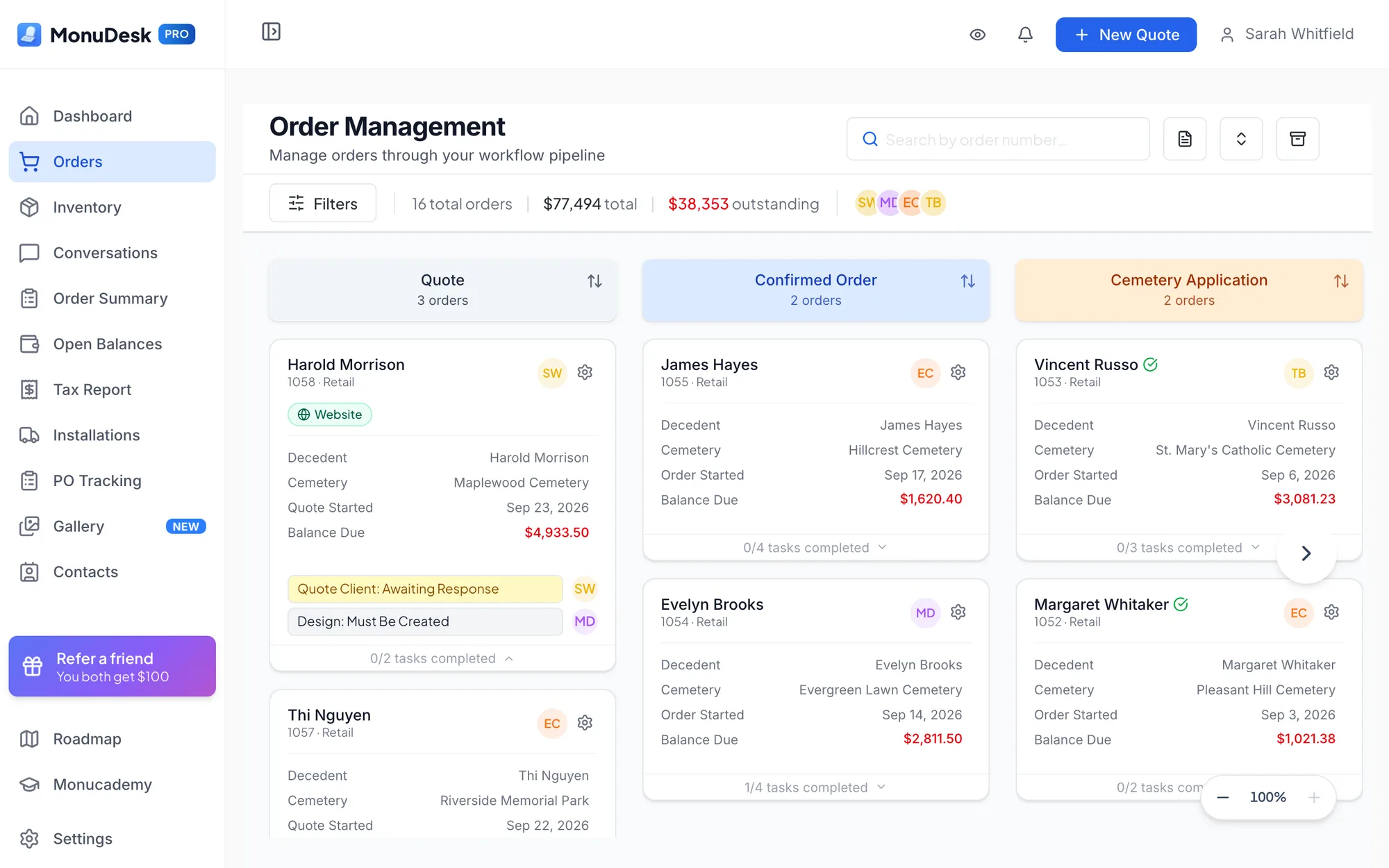
MonuDesk shows every order as a card on one board, with a column for each stage. The default stages are Quote, Confirmed Order, In Production, Order Balance Required, Installation Scheduled, Ready to Install and Completed. You can recolor them, rename all but Quote, Confirmed Order, Ready to Install and Completed, and add your own, for example Quote sent between Quote and Confirmed Order.
Each order also has its own to-do list. MonuDesk has 20 built-in to-dos, and each one appears only when the order needs it: a cemetery application to-do when the cemetery asks for an application, a foundation to-do when the cemetery requires a foundation, and a design to-do that follows the drawing until the family approves it. You can add your own to-dos and switch off the ones you do not use.
Moving a card from Quote to Confirmed Order confirms the order. The invoice, the confirmed-order to-dos and the QuickBooks Online sync follow by themselves.
Quotes from your own prices
MonuDesk builds each quote from your own prices. Accessories, saved line items and cemetery fees fill in by themselves, a matching past order (or, on Pro, an inventory item) fills in the stone, and the Price Book raises or lowers many prices at once. You can give a family several quote options, and the accepted quote becomes the order without retyping.
When an order starts on paper, nobody types it in. MonuDesk Paper Order Scan reads a photo or PDF of the paper contract, up to six pages, and fills in the new quote in about 10 to 20 seconds. How Paper Order Scan works.
Contracts, invoices and receipts from one entry
Everything typed on the order flows into the contract, the invoice and the receipt. One click makes each document, ready to print or send. Purchase orders for your supplier, foundation orders for the cemetery and shop tickets for the shop come from the same order, and on the Pro plan PO Tracking shows what is still out at each vendor.
Drawing approval and a family portal
Every family gets a secure link to their own order. In the MonuDesk family portal they see where their stone is, find their documents and pay online. On the Pro plan they also approve the drawing in the portal: MonuDesk records what was approved and when, and notifies you. Families who do not use a computer still get their paperwork the way they always have.
The portal is where the "is my stone in yet?" calls go. Wendy Feliciano of Carbone Memorials in New York told us that 40 of her 50 calls a day used to be families asking where their order was.
Cemetery permits, fees and foundations
MonuDesk stores each cemetery's rules once: whether it needs an application before you order the stone, whether it requires a foundation, which plot details it wants and what it charges. A fee can be worked out from the base or foundation size, per square inch, square foot or linear foot, or charged as a flat amount. Every order for that cemetery then gets the right to-dos and fees. How cemetery paperwork works in MonuDesk.
Installs on a calendar
The MonuDesk Installations page lists your monument orders grouped by cemetery, county or city, with the promise date you gave the family next to the scheduled install date. The calendar view lets you drag an install to another day and flags days with weather that blocks installs. The Installations page is on the Pro plan; booking an install from the order works on every plan. How installation scheduling works.
Deposits, balances and QuickBooks Online
MonuDesk tracks every deposit and payment on the order. Open Balances, on the Pro plan, shows what each family still owes, aged 0 to 30, 31 to 60, 61 to 90 and over 90 days. With MonuPay, available to dealers in the United States and Canada, families pay by card in the portal, and by bank transfer for a flat $20 fee once your account is approved for bank payments. On the Pro plan, invoices and payments go to QuickBooks Online without retyping. How the QuickBooks Online connection works.
MonuDesk on your phone
MonuDesk has an iPhone app on the App Store, and it opens in any phone browser with a phone layout. The phone camera scans paperwork straight into an order, and changes show up on the office computer at once.
What MonuDesk costs
| Plan | Monthly | Yearly, per month | What it adds |
|---|---|---|---|
| Basic | $149 | $129 | Order board, quotes, contracts, invoices, to-dos, family portal with online payment, Paper Order Scan, MonuStudio 3D designer |
| Pro | $299 | $249 | Drawing approval in the portal, QuickBooks Online, PO tracking, installs planning, open balances, inventory, tax reports |
| Max | $599 | $499 | MonuBrain AI assistant, MonuStudio on your own website, a website form that turns requests into quotes |
Each plan includes one user and one location. More users are $10 a month each and more locations $100 a month each. MonuDesk imports your contacts, cemeteries and vendors for free.
How MonuDesk compares
MonuDesk publishes a side-by-side comparison of ten monument software platforms, with each one's price, family portal, design tool, cemetery paperwork, accounting link and mobile app, and a source for every fact: Best monument software in 2026. There are also one-to-one comparisons with StoneSpot and MB ProBuild.
“Everything's all on one page, and I don't have to go through and open each order to figure out where we're at.”
“With MonuDesk we can see multiple things at a glance. You know, we're still waiting for the cemetery permit, we sent for the portrait, and we ordered the granite.”
Questions about monument order management software
Keep reading
- Best monument software in 2026Ten platforms compared on price, family portal, cemetery paperwork, QuickBooks and mobile app, with a source for every fact.
- Headstone business softwareWhat a headstone or memorial shop needs from its software, and the questions to ask any vendor.
- MonuDesk pricingBasic $149, Pro $299, Max $599 a month. Two months free on yearly billing.
Try MonuDesk for 7 days.
Put your next orders in it and see what your week looks like.