
Cemetery paperwork for monument dealers: applications, fees and foundations
MonuDesk stores each cemetery's rules once: whether it needs an application before you order the stone, whether it requires a foundation, which plot details it wants and what it charges. Every monument order for that cemetery then gets the right to-dos and fees by itself, and the foundation order for the cemetery or your contractor is one click.
By Dennis Rodin
Set up a cemetery once
In MonuDesk, every cemetery is set up once and reused on every order. A cemetery record holds:
- Name and address, picked from Google Places so the street, city, state and ZIP fill in.
- Contacts: the primary contact prints on shop tickets, and you can add the sexton, the office or the groundskeeper with their phone numbers and the best time to call.
- A cemetery link: a Google Maps pin, a Find a Grave page or the cemetery's own website, one click away for anyone on the team.
- County or zone, which sets the tax rate for new quotes at that cemetery.
- Cemetery Files: the cemetery's rules, maps and requirement sheets as PDF, Word or image files up to 50 MB, reachable from any device.
Already have a cemetery list? Import it from a spreadsheet, or send it to us in any format and we import it for free.
Applications before you order the stone
Some cemeteries want an application approved before the stone is ordered. Turn on Requires Application Before Ordering Stone for that cemetery, and every order for it gets a cemetery application to-do. Turn on Require Plot Details and nobody can save a quote for that cemetery without the section, lot and space, so you do not have to call the family back for them.
Foundations
Turn on Foundation Required for a cemetery that expects a foundation, and every monument order for that cemetery gets a foundation to-do.
MonuDesk makes the foundation order in one click. It goes to the cemetery or to the contractor who pours, and it carries the cemetery, section, lot and grave, the decedent's name, the base size, the foundation size and material, the number of graves it covers, where to center it and your notes. You can mark the foundation as above ground, flush or recessed.
Cemetery fees, calculated from the stone
MonuDesk adds each cemetery's fees to the order by itself. A fee can be worked out from the size of the base or the foundation, or charged as a flat amount, such as a flat marker fee or a double marker fee:
| Fee type | How it is calculated | Example: 48 by 20 inch foundation |
|---|---|---|
| Per square inch | Width x height x price per square inch | 960 square inches x $0.40 = $384.00 |
| Per square foot | Width x height / 144 x price per square foot | 6.67 square feet x $8.00 = $53.33 |
| Per linear foot | Longest side / 12 x price per linear foot | 4 feet x $5.00 = $20.00 |
| Fixed fee | The same amount on every order | Flat marker fee |
A minimum fee covers small stones: if the calculated fee is $25.60 and the minimum is $40, the order shows $40.00.
Fees are frozen on each order when it is saved. When a cemetery raises its fees, new orders use the new amount and orders you already wrote keep theirs, so a family's total never changes behind their back.
Installs by cemetery
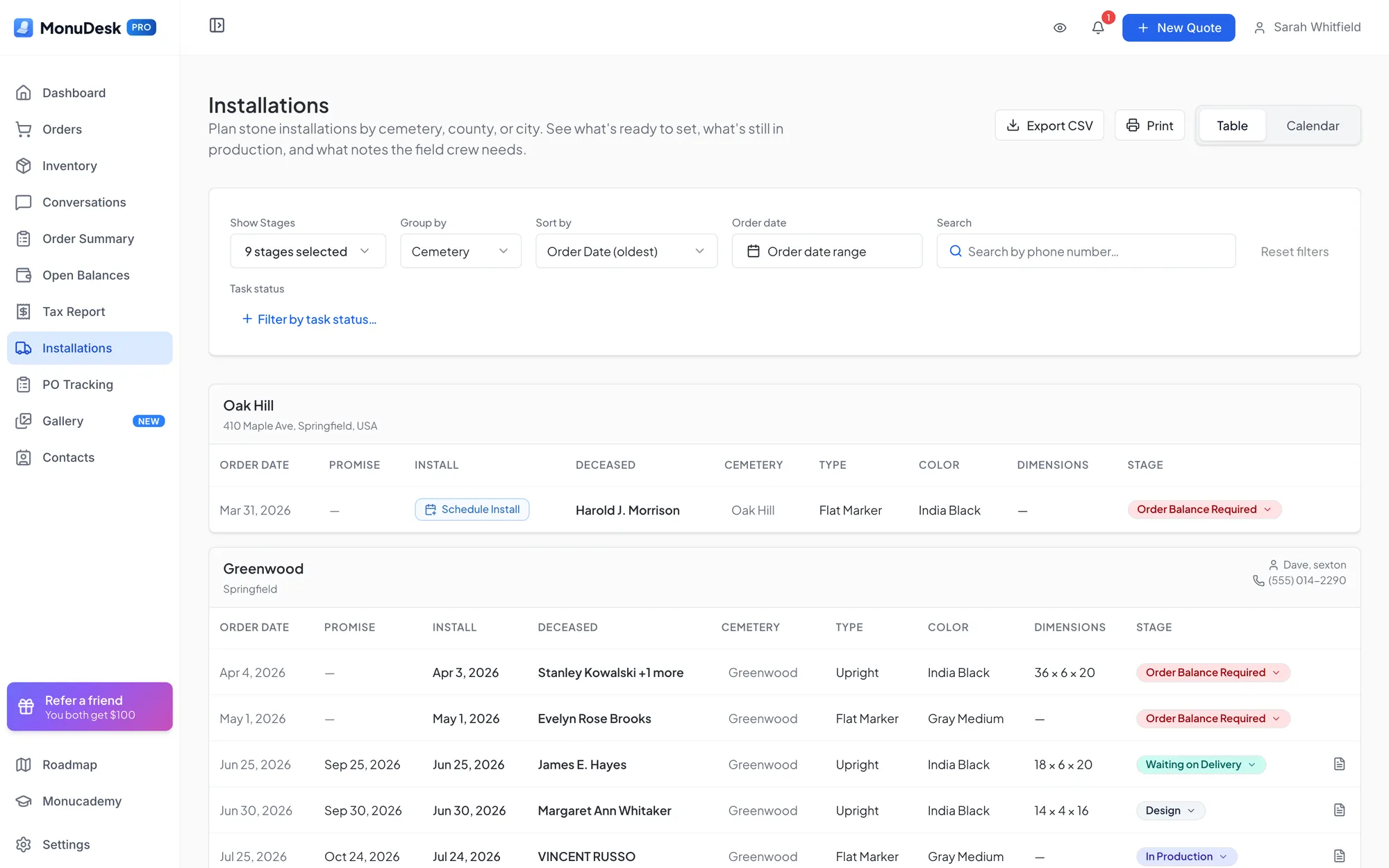
The MonuDesk Installations page, on the Pro plan, groups your monument orders by cemetery, county or city, so a crew can set several stones at one cemetery in one trip. It shows the promise date you gave the family next to the scheduled install date, and its calendar flags days with weather that blocks installs. How installation scheduling works.
The paper contract already knows the cemetery
When you scan a paper contract with MonuDesk Paper Order Scan, MonuDesk picks the matching cemetery from your list, or adds it when it is new, and ticks the cemetery's fees for each priced line it recognizes. How Paper Order Scan works.
More than one location
On an account with several locations, each office keeps its own cemetery list. Team members see the cemeteries of the offices they work in, and the owner sees all of them.
“Now that you've got the cemetery logistics, we can actually click the exact place in the cemetery. That is so helpful.”
“It gave me a list by promise date of what was coming up, whether it was lettering orders, new memorials, maintenance orders or burials. They all came up as a single list, which was cool, because that helps me plan with my guys in the shop.”
Questions about cemetery paperwork in MonuDesk
Try MonuDesk for 7 days.
Put your next orders in it and see what your week looks like.