
Monument installation scheduling, by cemetery and by crew
MonuDesk plans monument installations on a table and a calendar. Orders group by cemetery, county or city, the promise date you gave the family sits next to the day the crew sets the stone, each install can carry a time, an assignee and notes for the crew, the exact spot can be pinned on a map, and installs in the next 7 days are flagged when the forecast shows weather that blocks them, such as heavy rain, snow or strong wind. The Installations page is on the Pro plan, $299 a month.
By Dennis Rodin
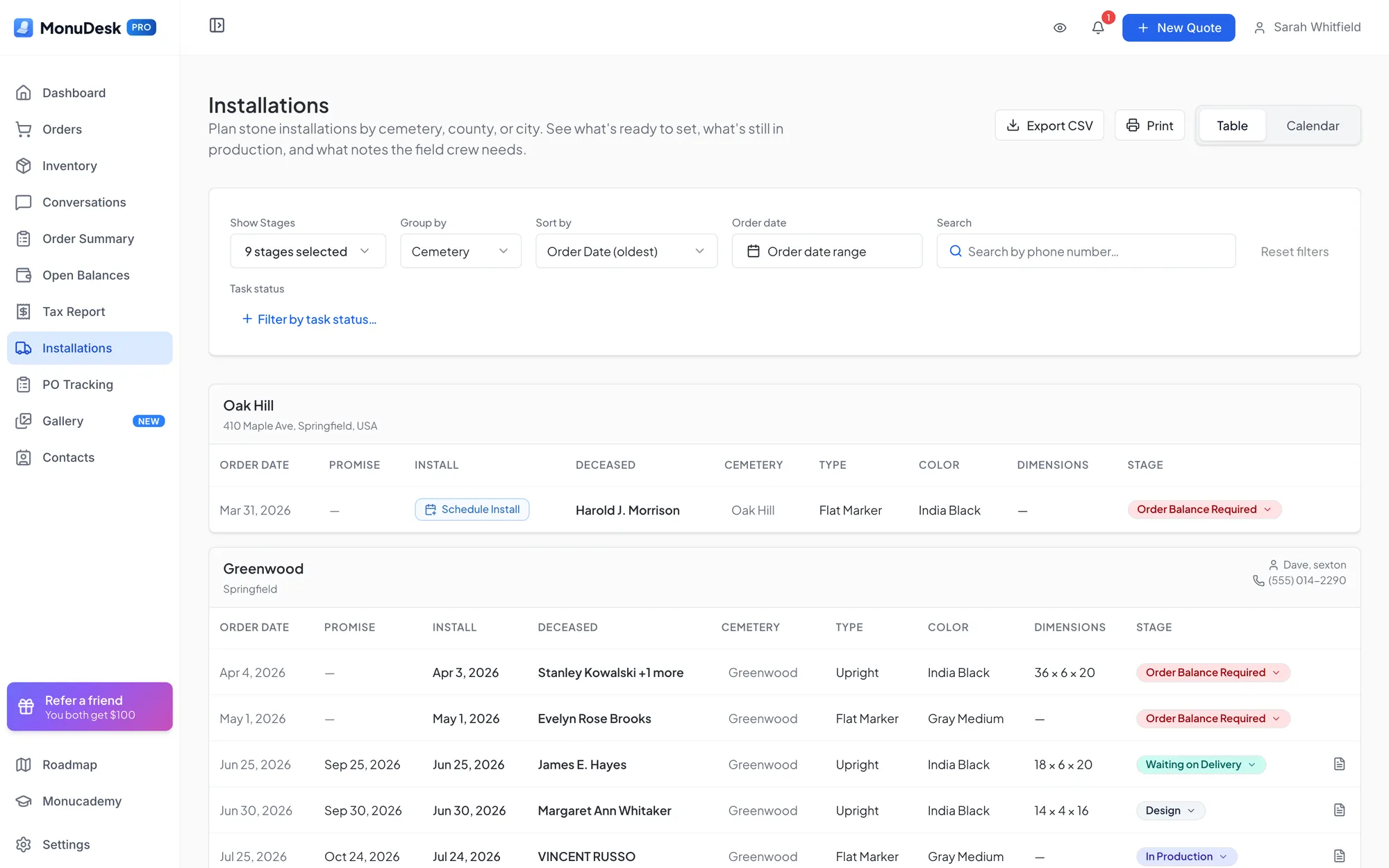
Plan installs by cemetery, county or city
The MonuDesk Installations page lists your monument orders grouped by cemetery, by county (or your own zones, such as North and South) or by city, so a crew can set several stones on one trip. Each row shows the order date, the promise date and install date, the decedent, the cemetery, the monument type, the stone color, the dimensions and the stage. Orders the family picks up gather under their own Customer Pickup heading. The table exports to CSV and prints.
Promise date and install date, side by side
MonuDesk keeps two dates on every install, and the calendar shows both:
- Promise date (red): the deadline you gave the family. It has no time of day.
- Install date (blue): the day the crew is scheduled to set the stone. It carries a time, can have an assignee, and is usually earlier than the promise date.
Seeing both on one calendar shows at a glance which promises are at risk.
Three ways to schedule an install
- From the table: click Schedule Install on an order's row and pick the day, time, assignee and notes.
- From the calendar: click a day, search for the order and set the details.
- Drag and drop: drag an order without a date from the strip under the calendar onto a day, then finish the details.
A missing cemetery or plot does not stop you: MonuDesk warns you, and you can edit the order first or schedule anyway.
Assign the crew and leave notes
Each install can have an assignee, whose initials show on the calendar, and notes for the field crew that travel with the order. Drop a pin on a map to mark exactly where the cemetery or the installation is, so the crew goes to the spot instead of an address; the pin travels with the order. The calendar shows a month, two weeks, a week, three days or a single day, and the Day view prints the day's schedule for the crew.
Weather warnings from the 7-day forecast
Installs in the next 7 days get an amber rain-cloud icon and a "Rain likely - consider rescheduling" note when the forecast for your company's location shows weather that blocks installs during working daylight: thunderstorms, snow, freezing rain or freezing drizzle, heavy rain, wind of 20 mph or more, or a high of 32°F or below. Light rain, ordinary drizzle and fog do not flag, and installs more than 7 days out have no forecast.
Tell the family when the stone goes in
When you book an install day, MonuDesk offers to email the family. The email carries the install date and time, the cemetery, the decedent's name and a fresh link to their portal. Nothing is sent unless you click Notify customer.
Appointments and production on the same calendar
The calendar has four tabs: All, Installation, Appointments and Production. Appointments and general events sit next to the installs, and the Production tab shows the shop's own work, so one calendar answers "who is where, and what is the shop cutting this week".
Which plan
The Installations page, with its table, calendar, CSV export and print, is on MonuDesk Pro, $299 a month or $249 a month on yearly billing. Booking an install from the order's own scheduling section works on every plan, including Basic at $149 a month.
“It gave me a list by promise date of what was coming up, whether it was lettering orders, new memorials, maintenance orders or burials. They all came up as a single list, which was cool, because that helps me plan with my guys in the shop.”
“Now that you've got the cemetery logistics, we can actually click the exact place in the cemetery. That is so helpful.”
Questions about scheduling installs in MonuDesk
Try MonuDesk for 7 days.
Put your next orders in it and see what your week looks like.